Preview every armor trim before you spend the template
18 patterns × 10 materials × 4 bases - pick a look,
see it on all four armor pieces at once. Original schematic drawings, honest labels, zero guessing.
18 trim patterns10 trim materialsUpdated November 04, 2026
Original schematic illustration - stylized shapes and colors, not game assets.
In-game art belongs to Mojang; this preview reads like the system at a glance.
Trim pattern 18
Trim material
Armor base
Sentry trim in Iron on an Iron base - found in Pillager Outpost chests.
How to use the tester
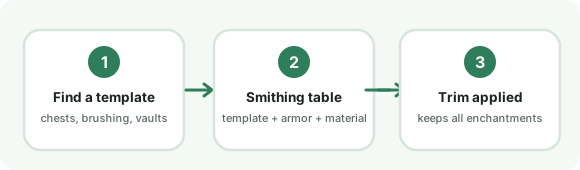
The in-game flow the preview replaces - three steps and a spent template.
1 - Pick a pattern. The pattern decides the shape of the decorative bands: chevrons for
Sentry, waves for Coast, a compass star for Wayfinder. The pattern comes from where you found the
template - the trim locations guide lists all 18 with their sources.
2 - Pick a trim material. The material is the color of the pattern bands - 10 options from
Iron to Quartz, each with a personality note in the materials guide.
3 - Pick your base. The same trim reads differently on Iron, Gold, Diamond and Netherite
bases, which is exactly why choosing in a preview beats choosing at a smithing table.
When a combination looks right, find the template once, then duplicate it (7 diamonds plus one
themed block) so the look is renewable - the smithing guide has
the full flow, including the one trim that cannot be duplicated.
What trims actually change (and what they do not)
A trim is two decisions: which pattern template you apply, and which material you apply it in.
The result is decorative - pattern bands in the material color, following the armor piece's edges.
Nothing else moves: protection values, durability and enchantments are identical before and after.
That makes trims the safest kind of flex in the game, and it makes the real decision purely visual -
which is the gap a schematic preview fills. The in-game flow costs a template per application, and
templates are structured loot (chests, archaeology brushing, vaults), so experimenting in-game means
either farming duplicates first or living with a look you picked blind. Here, the 180 pattern-material
pairs cost nothing to flip through, and the four bases show how the same pair shifts with what you
are wearing underneath.
Two honest limits of this preview: colors are close approximations, not pixel-exact renders, and
the pattern shapes here are original geometric interpretations - recognizable as "the Sentry chevron"
without copying Mojang's art. If a screenshot-perfect reference matters for a build video, the game
itself is the source of truth; for choosing between Gold and Lapis on a Diamond chestplate, a
schematic is faster than a second playthrough.
Frequently asked questions
What does the armor trim tester do?
It previews the 18 armor trim patterns in 10 materials on 4 armor bases as original schematic illustrations - pick a pattern, a material and a base, and the four-piece preview updates instantly. It is for choosing a look before you spend a real smithing template.
Are these the real in-game textures?
No, and the page says so on the preview itself: the shapes and colors here are original stylized illustrations that follow the same system (pattern bands on armor edges in the trim material color), not Mojang game assets. The pattern names and locations are factual; the drawing is schematic.
How many armor trim combinations are there?
18 patterns in 10 materials is 180 pattern-material pairs, and with a base armor choice the visual space is 720+ looks. The guide pages narrow that to the combinations players actually wear.
Does trimming change my armor stats?
No. Trims are purely visual - enchantments, durability and protection are untouched. That is also why testing a look here costs nothing: the only real cost in-game is the template you consume.